
.svg?fit=max&auto=format&n=TXbctGXcm1Pz2lVZ&q=85&s=576d21ef0a25157103e61662336af415)
Start the Emulator
DevTools ships with the dev server. In a scaffolded project, start it from the project root:http://localhost:3000/mcp: your MCP serverhttp://localhost:3000/: the DevTools
Explore the Features
Select a tool in the sidebar and DevTools gives you the full exchange: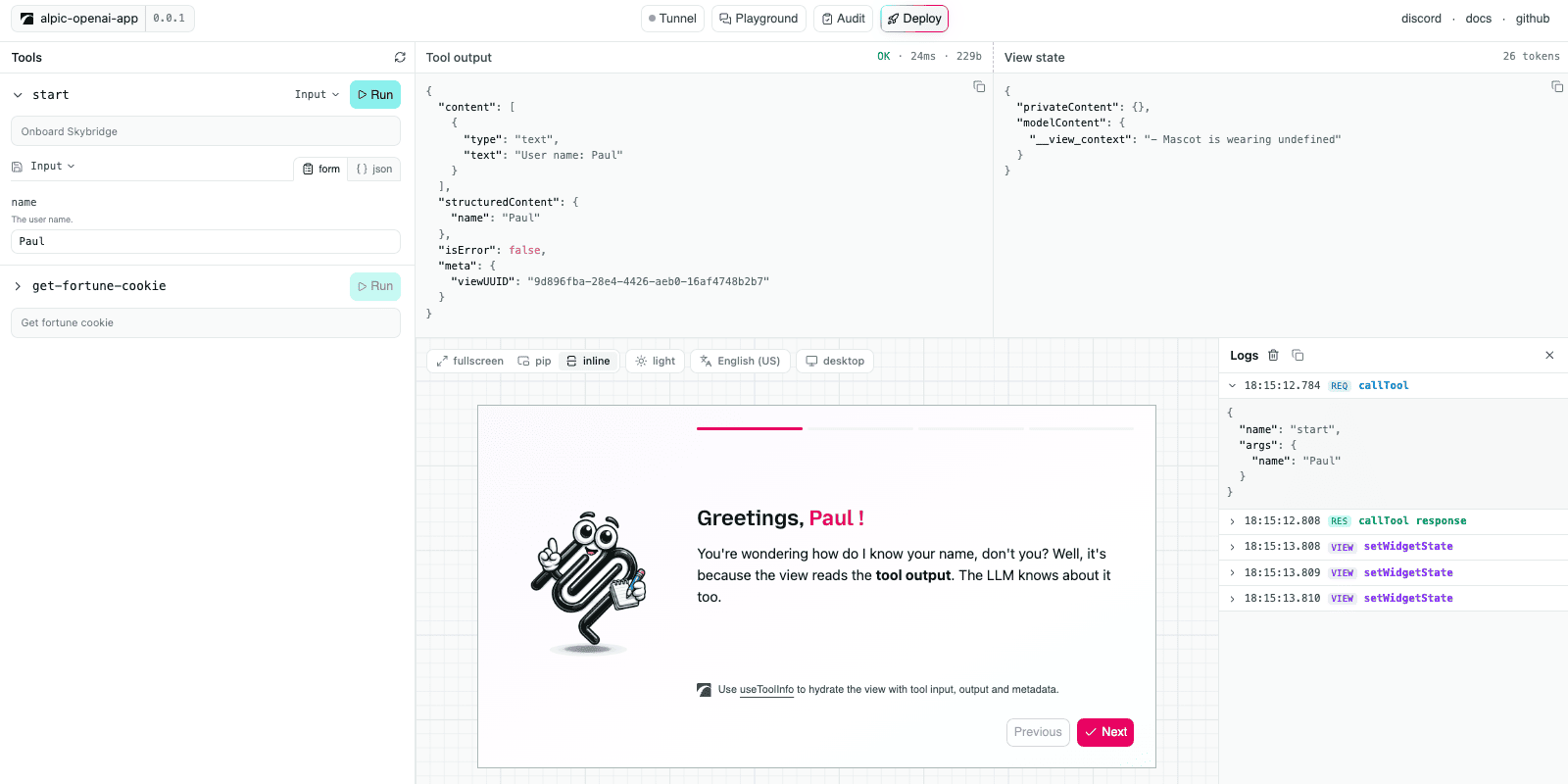
The DevTools interface
- Tool controls: generated from the tool’s input schema. Inputs can be saved and re-run from the tool header.
- Tool output: the raw server response (
content,structuredContent,_meta), with status, latency, and payload size. - State inspector: the view state as a JSON tree, updated as the view mutates it.
- View preview: the rendered View, with live controls to switch display mode, theme, locale, and device type; the preview updates immediately.
- Call logs: every runtime API call the view makes (
setViewState,callTool,requestDisplayMode) with its arguments and responses.
Drive DevTools from a Coding Agent
DevTools exposes its actions as WebMCP tools, so a coding agent that drives your browser runs them directly. The agent connects through chrome-devtools-mcp, an MCP server that discovers and calls a page’s WebMCP tools. On the DevTools page it can:- Run any registered tool and render its view in the preview.
- Read the rendered view by screenshotting the preview, then drive it as a real page.
- Switch the preview controls: display mode, theme, locale, and device.
Set It Up
1
Add chrome-devtools-mcp to your agent
Register the MCP server with the WebMCP flag, forwarding the browser feature flag to the Chrome it launches.
- Claude Code
- Codex
- Cursor
- Others

2
Start DevTools
Run
npm run dev and open the DevTools URL printed in the terminal.3
Prompt your agent
Open my app in DevTools, run a tool, and check the view renders
WebMCP is experimental and supported Chrome version 149 or newer.
Authenticated Servers
When your server requires OAuth, DevTools registers itself through Dynamic Client Registration on first connect and walks the full PKCE flow as a public client. A server that needs a pre-registered client or a different grant type won’t connect from DevTools. DevTools caches the authorization within the browser, so later sessions reconnect without prompting. To clear a cached registration, click Sign out in the header.Limitations
DevTools emulates, and three gaps separate the emulation from production:- No model: you pick the tool and type the arguments yourself. Tool selection, the prompt surface (names, descriptions, schemas), and follow-up messages are never exercised.
- One runtime: as of today the preview mocks the Apps SDK runtime. MCP Apps-specific features are not yet supported.
- Loose CSP: external resources blocked by hosts in production may load locally.
To test your app against a real LLM, use the playground or connect your server to ChatGPT or Claude using the tunnel.
Go Further
Tunnel
Expose your local server to real hosts
Playground
Chat with a real model running your app
Audit
Catch spec and platform issues before submission